
What It Is
Durable operating information only — the things that stay true between campaigns. Four artefacts sit around a social account and they are easy to confuse.
- Internal Service Brief
- What Sales handed to Delivery.
- Account Guide
- What Delivery learned and established during onboarding. This document.
- Roadmap & calendar
- The changing delivery plan.
- Productive tasks
- The work that needs to happen.
How It Is Made
Written during Social Media onboarding, once the team has established the account’s core information.
Gather what already exists
The approved proposal, the Internal Service Brief, onboarding notes, and the client’s existing channels and materials.AI drafts it
Give it the example below as the structure and the material above as the source.Social Content Lead reviews and corrects
The Social Content Lead owns the final accuracy. The AI draft is only a starting point.Store it in Productive → Docs
On the client project, named ClientName_Social-Media-Account-Guide_YYYY-MM-DD.Update when something material changes
A new channel, a new approver, a changed constraint. Not every month, and not as a running log.
What It Captures
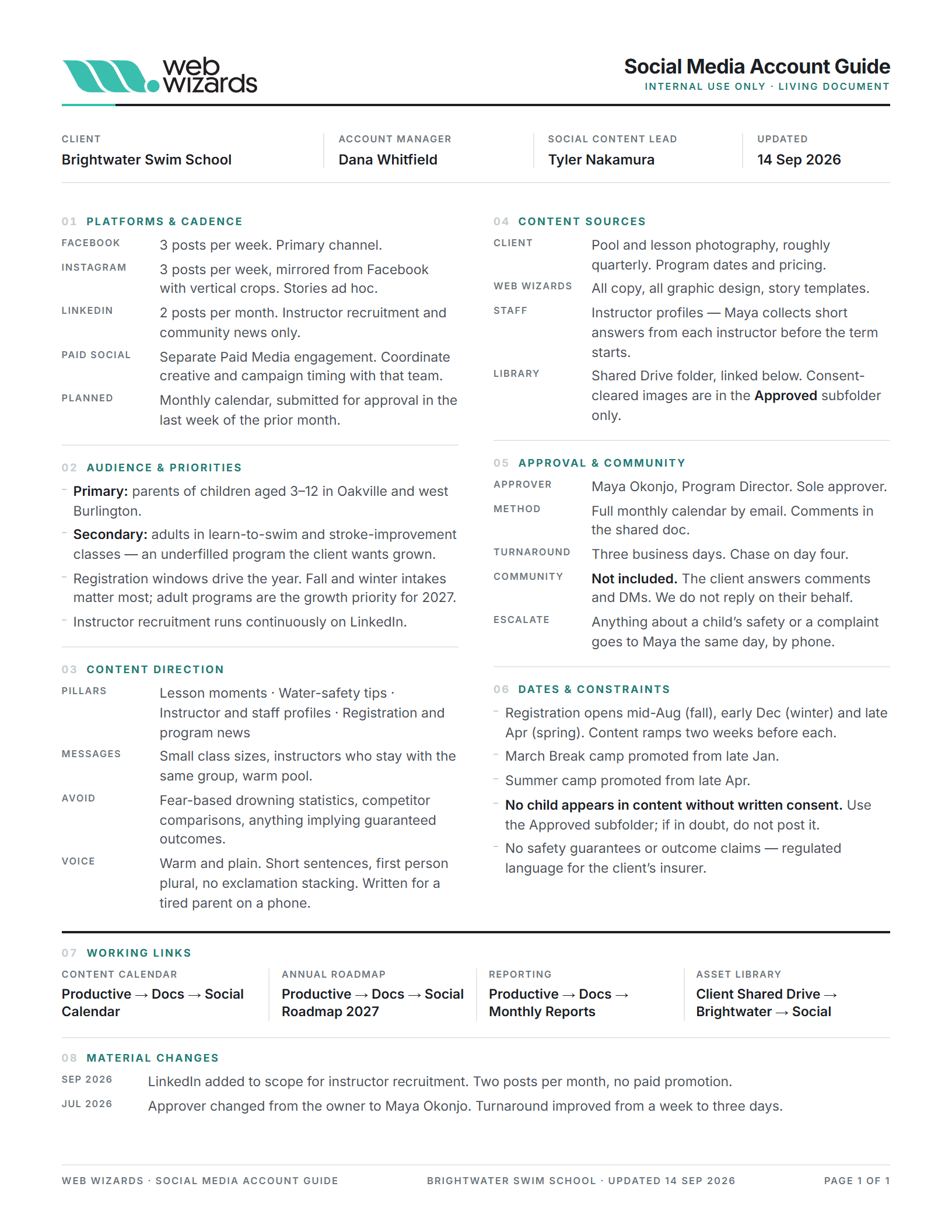
Eight short sections. One page for a normal account.
- 01 Platforms & cadence
- Channels managed, how often each one posts, and whether there is a related paid social engagement — not included, a separate Paid Media engagement, or included and coordinated with them.
- 02 Audience & priorities
- Who the content is for, and what the business is pushing.
- 03 Content direction
- Pillars, key messages, what to avoid, and brand voice notes.
- 04 Content sources
- What the client supplies, what we create, who contributes, where assets live.
- 05 Approval & community
- Approver, method, turnaround, whether community management is included, and the escalation rule.
- 06 Dates & constraints
- Recurring promotions, seasonal periods, events, and any regulatory limits.
- 07 Working links
- Calendar, roadmap, reporting and asset library.
- 08 Material changes
- Durable changes to how the account is run — a new approver, a platform added or dropped, cadence materially changed, community management turned on or off, a new compliance restriction. Two or three lines. Not an activity log, meeting notes or monthly history.
The Example
A fictional swim school — an ordinary organic social account, filled in the way a real one should be. Use it as the structure and the level of detail, not as copy to edit.
Download
Social Media Account Guide — worked example
One page, US Letter, PDF.