
This page is the process. How we think about running a social account — roles, content model, planning horizon, approval standards — is in Service Standards.
Onboarding at a Glance
Eleven steps from a signed proposal to a first content calendar. Each one is written out below.
- Complete Internal Service BriefSalesperson
- Complete Internal Handoff MeetingAccount Manager
- Prepare Client Intake QuestionnaireAccount Manager
- Send Client Onboarding Email & Intake QuestionnaireAccount Manager
- Review Client Intake Questionnaire & Prepare for KickoffAccount Manager + Social Content Lead
- Complete Client Kickoff MeetingAccount Manager
- Confirm Social Access & AssetsAccount Manager
- Conduct Social Media Strategy Session(s)Social Content Lead
- Create Client Social Media StrategySocial Content Lead
- Present Strategy & Obtain Client ApprovalAccount Manager + Social Content Lead
- Prepare First Monthly Content CalendarSocial Content Lead
Complete the Internal Handoff
Social starts from the proposal and the Internal Service Brief, not from a conversation with the client. The Internal Handoff standard covers how the meeting runs.
Delivery should leave the handoff knowing
- What was sold
- Which channels are included
- Posting cadence
- The client's goals
- Who is responsible for content
- The reporting commitment
- Whether community management is in scope
- Whether Paid Media is also included
- Any unusual commitments or client context
Set Up the Project in Productive
With the handoff done, set the live project up before client onboarding gets underway. The template carries the standard task structure, so almost nothing has to be built by hand.
02.1
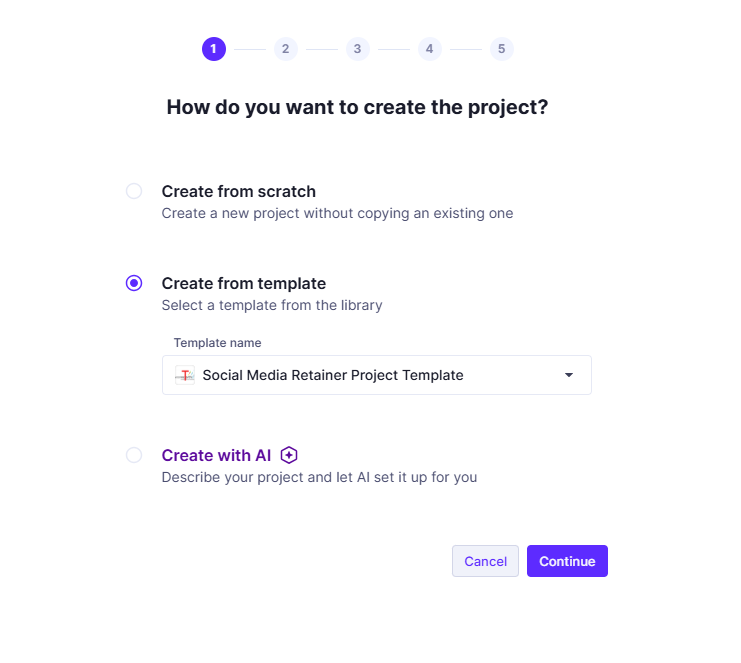
Create the project
From the client account, open Projects and choose + Project.

Choose Create from template and select Social Media Retainer Project Template.
02.2
Name and configure it
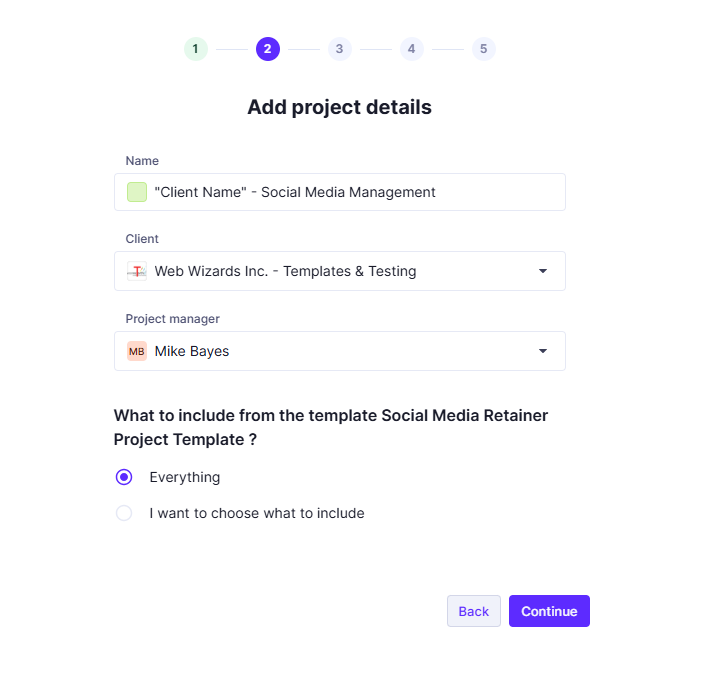
Name the live project Client Name – Social Media Management. For example, All Weather at Home – Social Media Management. The words “Template” and “Retainer Project Template” do not belong in a live project name.
Set the Client to the actual client and the Project manager to the Account Manager. When Productive asks what to include from the template, choose Everything.
 View full size
02.3
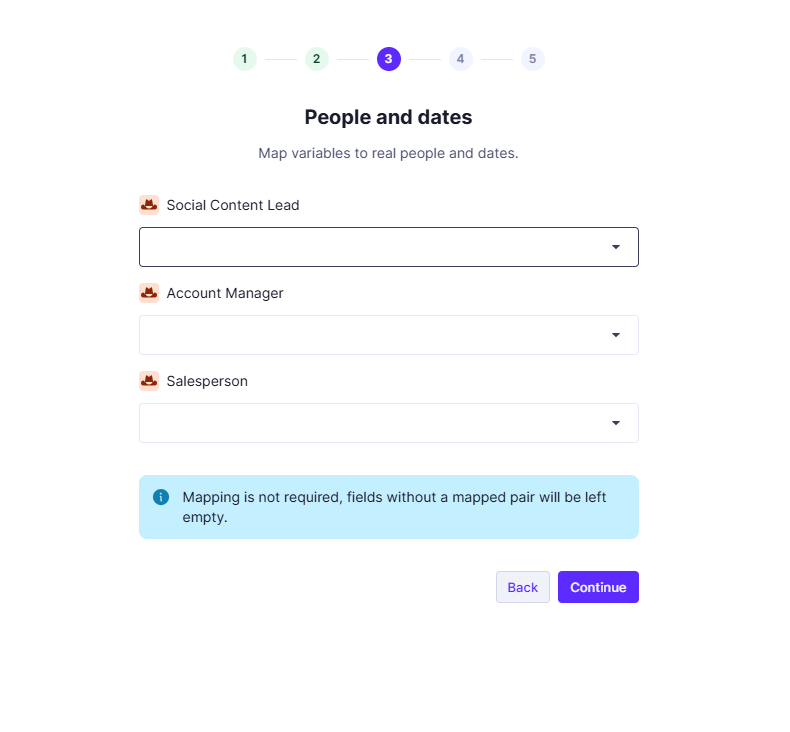
Map the project roles
The template uses role placeholders rather than names. Map each one to the person actually doing the work:
- Social Content Lead
- The assigned Social Media Specialist.
- Account Manager
- The assigned Account Manager.
- Salesperson
- Whoever sold the engagement.
02.4
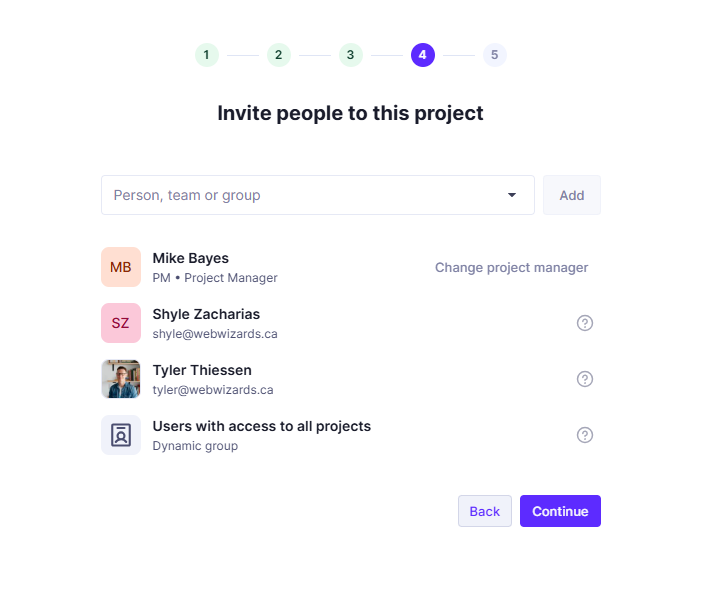
Confirm who is on the project
The people you mapped should appear automatically. Review the list and add anyone else only where there is a real reason for them to have access to this client’s work. Do not add the whole Digital Marketing team by default.
Add and Configure the Budget
The budget is part of the same wizard, but it is not finished when the wizard ends. Two things have to be corrected afterwards, and both are easy to miss.
03.1
Create it from the template
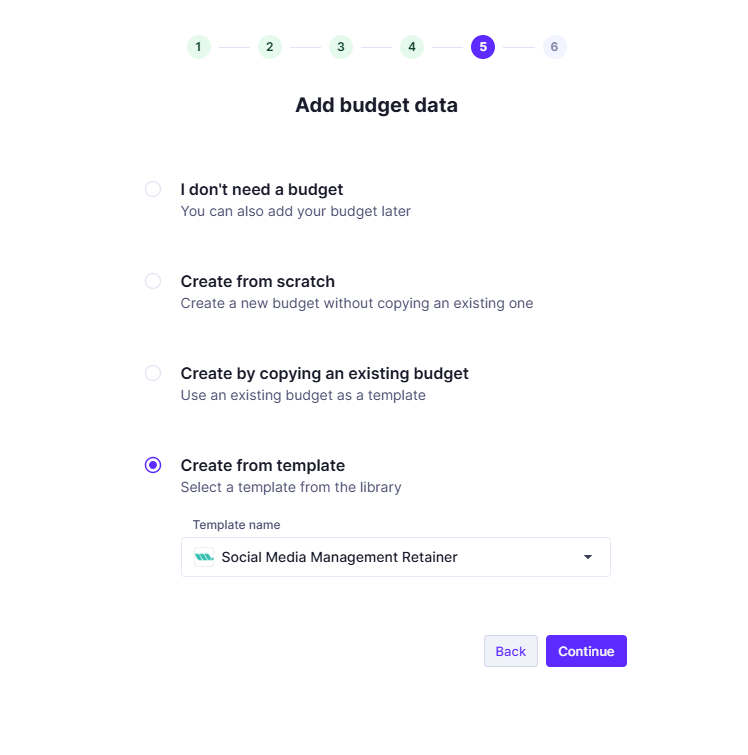
When Productive asks for budget data, choose Create from template and select Social Media Management Retainer.
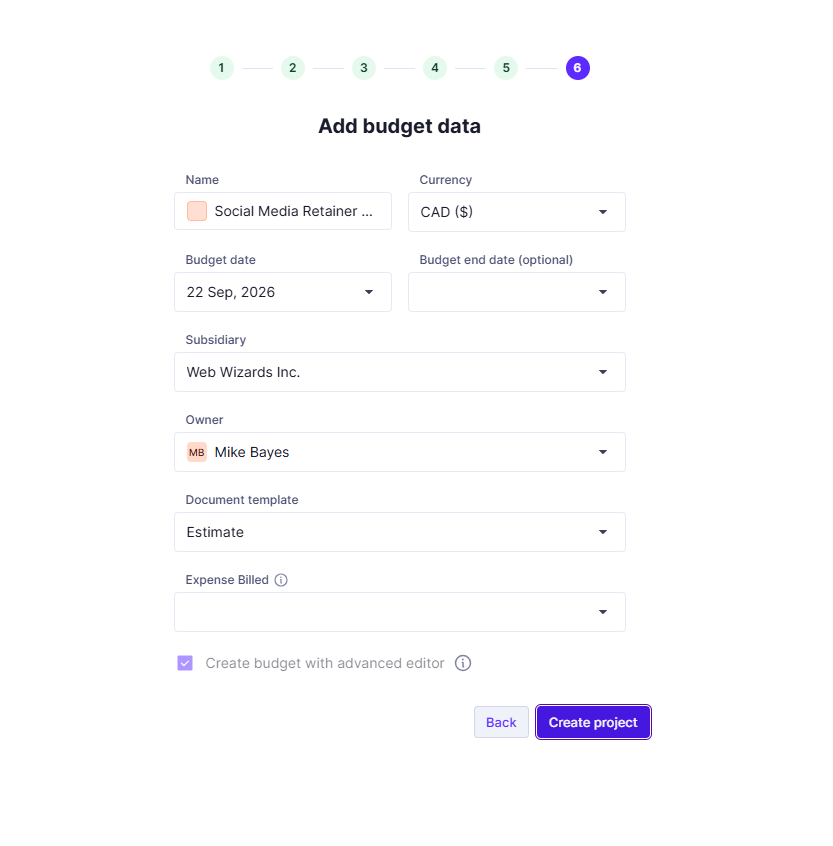
On the next screen, confirm the currency, confirm the Web Wizards Inc. subsidiary, set the Account Manager as budget owner, and use the actual service start date where it applies. Then create the project.
03.2
Replace the template amount
Open the budget and choose Edit. Replace the template amount with the actual monthly Social Media fee from the approved proposal.
 View full size
03.3
Make the budget recurring
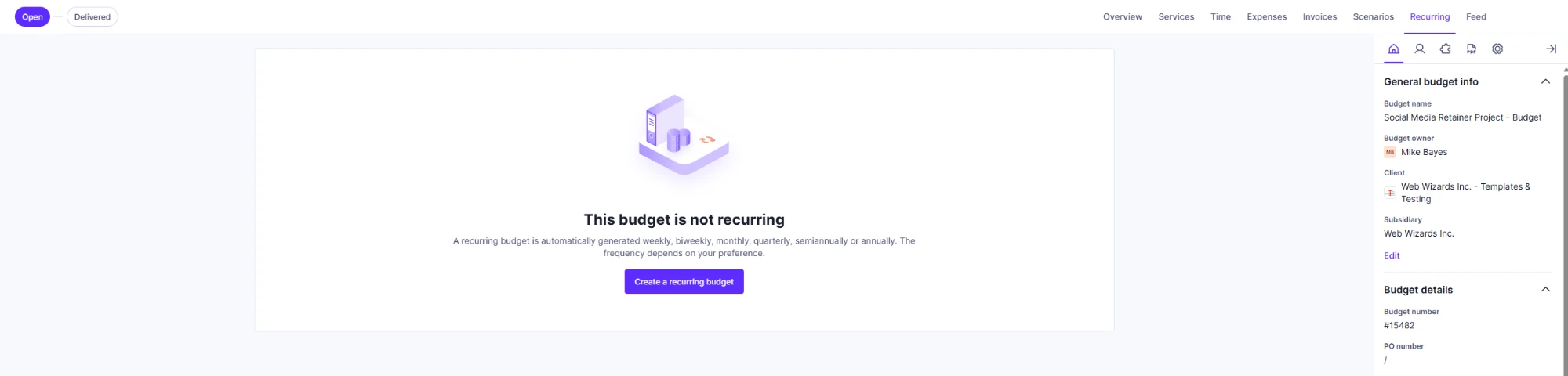
Open the budget’s Recurring tab and choose Create a recurring budget.
Settings
- Recurring interval
- Monthly.
- Next occurrence
- The first day of the next month.
- Stops recurring on
- Leave blank unless the agreement has a defined end date.
- Create invoices automatically
- On.
- Everything else
- Leave off unless there is a specific client reason to use it.
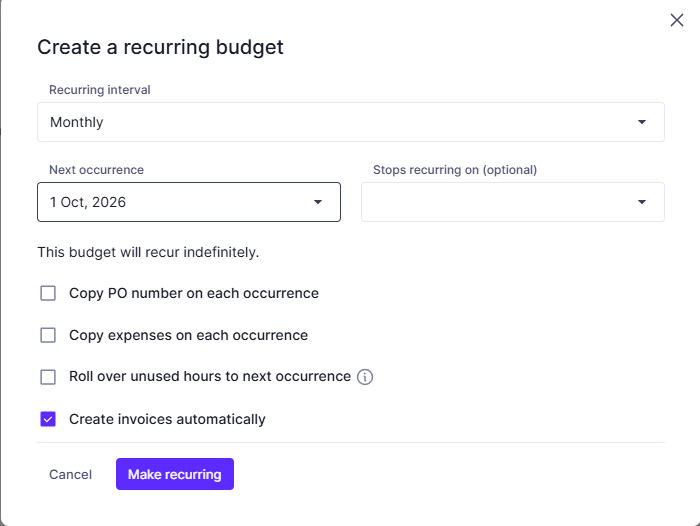
Then choose Make recurring.
Set Task Dates and Recurrence
The template contains the tasks but no dates. The Account Manager sets the first due dates and the recurring schedules once the live project exists.
Choose dates from the actual client start date, the onboarding timeline, the reporting commitment in the proposal and the content production cycle. There is no standard first due date, because there is no standard start date.
Recurring tasks and their cadence
- Prepare Monthly Content Calendar
- Monthly.
- Create & Publish Monthly Social Content
- Monthly.
- Review Performance & Prepare Social Media Report
- On the reporting cadence agreed in the proposal, which is not monthly for every client.
- Prepare & Conduct Quarterly Business Review
- Every three months.
- Refresh Annual Content Roadmap
- Annually.
Send the Onboarding Email & Intake Questionnaire
Once the handoff is done, the Account Manager sends the onboarding email with the Client Intake Questionnaire, using the Client Onboarding Email template. It should introduce the Account Manager and the delivery process, say what happens next, provide the questionnaire and set out the timeline below.
The timeline we give the client
- Week 1 — Get set up
- Team introduction, Client Intake Questionnaire and initial preparation.
- Week 2 — Understand and plan
- Client kickoff and Social Media Strategy Session.
- Week 3 — Develop and approve strategy
- Web Wizards develops the Client Social Media Strategy and reviews it with the client.
- Week 4 — Prepare to launch
- The first Monthly Content Calendar is created and prepared for approval and production.
It is a shape, not a service level agreement. Complexity, access and client availability all move it.
Review the Intake & Run the Kickoff
The kickoff is deliberately lightweight, and is often the first time the client meets the delivery team. The Client Kickoff standard covers how to run it.
- Introductions
- Review the questionnaire together
- Fill the gaps it left
- Confirm or clarify the important answers
- Identify the access and assets we will need
- Confirm client contacts and the approval structure
- Explain what happens next
Confirm Social Access & Assets
After the kickoff, once we know what the account actually needs. The general process is in Access & Assets; only the social-specific list belongs here, and only for the channels actually scoped.
- Channels
- Facebook Page and Instagram, plus the Meta business account or asset structure behind them. LinkedIn Company Page, TikTok or YouTube where scoped.
- Measurement
- GA4 where social traffic is reported on, and any social analytics or reporting the client already runs.
- Assets
- Brand guidelines, photography, video, creative assets, product information and whatever else the content will be built from. Website or CMS access is not needed by default — ask only if the scope requires it.
The Social Content Lead verifies that the access actually works. Granted is not the same as working, and finding out in week four is expensive.
08.1
Record the baseline
Once access works, record where the account started: followers, recent reach or impressions, engagement, recent posting frequency, and social traffic where it is useful. Captured once, so that in six months there is something to compare against.
Conduct the Strategy Session(s)
A separate, deeper working conversation, led by the Social Content Lead. One session is enough for a straightforward account; a larger or more complex engagement may need more than one.
Topics, as they apply
- Business priorities
- Priority products and services
- Audiences and what motivates them
- Differentiators and core messages
- Content pillars and creative direction
- Content sources
- Major campaigns, events and seasonality
- Topics or claims to avoid, and brand constraints
- Approvals and community management expectations
The standards behind each of these — how we think about audiences, pillars, cadence and approval — are in Service Standards.
Create the Client Social Media Strategy
The Social Content Lead writes it from everything gathered so far: the approved proposal, the Internal Service Brief, the intake questionnaire, the kickoff and the strategy session(s).
What belongs in it, and why it is kept separate from the calendar and the task list, is set out in Service Standards → The Client Social Media Strategy. A one-page template is in Templates & Resources.
Present the Strategy & Obtain Approval
This is the point at which we find out whether we understood the client, and it is cheaper to find out now than in the third month of content.
- Present the strategy to the client
- Confirm we understood them correctly
- Review audiences, messages and content pillars
- Gather feedback and identify what needs to change
- Revise where required
- Obtain approval before detailed content production begins
Prepare the First Monthly Content Calendar
Once the strategy is approved, the Social Content Lead builds the first calendar and prepares it for approval and production.
For each piece of content, where it applies
- Channel
- Intended publish timing
- The post or content concept
- Creative requirements
- Approval status
Onboarding Is Complete When
All of these are true. Then the client moves into normal Ongoing Delivery.
- The live Productive project is configured
- Project roles are mapped
- The correct monthly fee from the proposal is entered
- The recurring Social Media budget is configured
- Task dates and recurrence are set
- The Client Intake Questionnaire is complete
- The Client Kickoff is complete
- Required social access and assets are verified as working
- Strategy Session(s) are complete
- The Client Social Media Strategy is complete
- The client has approved the strategy
- The first Monthly Content Calendar is ready for approval or production
- Remaining blockers have an owner